Hub Settings¶
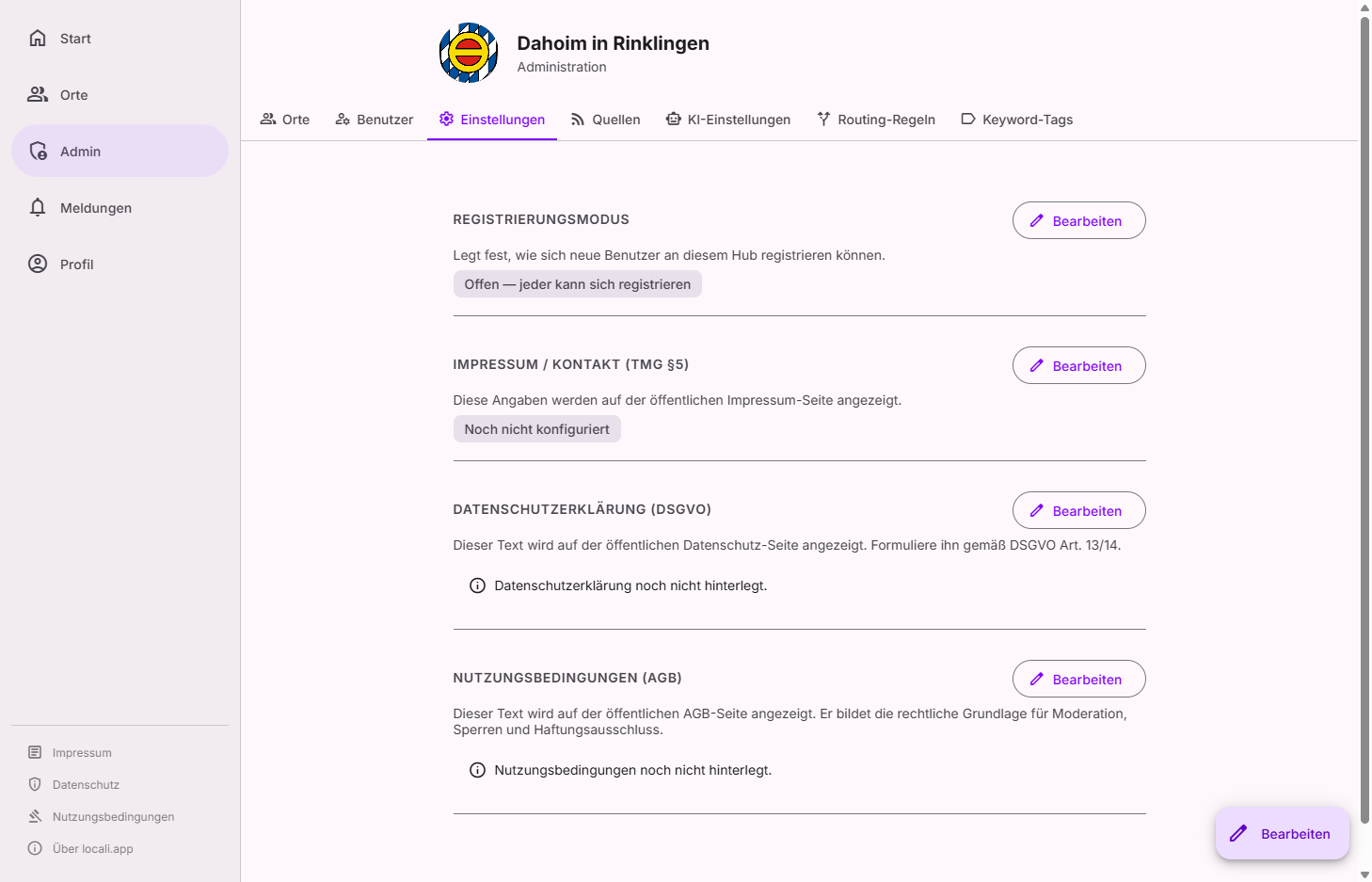
Hub settings control global configurations for the entire locali hub: hub name and logo, registration mode, welcome text, the default map view, and legal texts.
Tip: For the initial setup — imprint, privacy policy, terms, and welcome texts in one go — there is the guided hub setup wizard.
Roles: who can do this?
The hub settings (identity, registration mode, welcome text, map, legal texts) are changed by hub admins only. Exception: the hub's invite codes — instance moderators may create, view and revoke them as well. Need an admin? Under Governance → Users (facet Admins) you can see who to contact.
Hub information¶
Shows the hub name and logo. Click "Edit" to change them.
Registration mode¶
| Mode | Description |
|---|---|
| Open | Anyone can register |
| Invite | Only users with a valid invite code can register |
| Closed | No new registrations allowed |
The current mode is shown prominently. Click "Edit" to change it.
Invite codes¶
In Invite mode, codes can be generated and managed here.
| Column | Meaning |
|---|---|
| Code | The invite code (shared via email or link) |
| Used | How many times the code has been redeemed |
| Max. uses | Maximum redemptions (empty = unlimited) |
| Valid until | Expiry date (empty = no expiry) |
Spaces (community module)¶
Controls how much of the spaces module this hub runs. The setting is enforced server-side — it applies to space owners, moderators and hub admins alike, with no exemption.
| Mode | Meaning |
|---|---|
| Fully active | Members can post, comment and react in spaces |
| Read only | Nobody can write posts or comments or be promoted above "Guest"; spaces stay readable, and entries from organisations and sources still reach them |
| Switched off | Space pages and endpoints are unreachable; /spaces redirects to the start page |
A freshly set-up hub starts in "Read only" — the setup wizard preselects it; you decide there (or later here) whether the hub should be more than an information platform. No data is ever deleted — the setting can be changed back at any time.
Note on "Switched off": this also removes the district filter on the public pages, because it is derived from the spaces. For a curated information service, Read only is usually the right level.
Every change of the mode is written to the record.
Welcome text¶
An optional introduction text on the public start page for signed-out visitors – shown above and/or below the sign-in panel. Markdown is supported (bold, italics, headings, links, lists).
Map and places¶
Two settings concern the public map; their effect is described on the Places page:
- Default map view – start section and zoom level for visitors without a saved map view (only visible when the map is configured).
- Org pins on the map – the policy determining whether map pins of organisations always pass the places review before being published.
Direct publishing¶
The hub-wide master switch that lets organisations write their own posts and events directly in locali. When it is off, no organisation can enable itself and the corresponding block disappears from their settings.
| Setting | Meaning |
|---|---|
| Enable direct publishing on this hub | The master switch. Default: off. |
| Number of first entries under review | How many entries of a newly enabled organisation are reviewed before publication. Default: 3, allowed range 1–10. |
With the master switch on, organisations enable themselves — in their management area under Settings → "Publish your own", by their owner, regardless of organisation type. There is no approval queue for this. As a sanction you can withdraw an organisation's permission under Governance → Organisations; it can then no longer enable itself, only you can restore it.
The submitted first entries wait under Governance → Direct publishing. The aim is a decision within 24 hours; a rejection always names the concrete rule and returns the entry for revision.
Central areas¶
Two separate switches for the public aggregate page "Aktuelles & Termine":
| Switch | Default | Effect |
|---|---|---|
| Show events | on | The public town calendar as a page and as a calendar subscription. |
| Show posts | off | The collected posts of all organisations. |
- Exactly one on — no tabs, the page shows that area directly.
- Both on — two tabs.
- Both off — the navigation entry and the page disappear entirely; the address is not reachable directly either.
Never affected: the feeds of the individual organisations (RSS and calendar) and their own pages. They belong to the organisation, not to the aggregate page, and keep working independently. The town calendar file, by contrast, follows the "Show events" switch.
Below the switches, a decision aid for the posts area shows how many posts were published in the last four weeks and by how many distinct organisations. The guideline is eight posts per week across eight distinct organisations for four weeks. The numbers are information only — locali never flips anything automatically.
Operator policies¶
Three values that are promises and guarantees the operator makes — every change is recorded in the record:
| Policy | Meaning | Default |
|---|---|---|
| Report response target | How long a report should wait at most; older ones are flagged red. Adjustable 24–336 hours (1–14 days). | 48 hours |
| Record retention | How long the record keeps entries before a background job deletes them permanently. Adjustable 6–120 months. | 24 months |
| Responsible person required | Whether an organisation may only publish once it has named a person answerable for its content. | off |
The response target is a promise to complainants, not an automatic deadline — nothing happens by itself when it passes; the row simply becomes visibly overdue.
Legal texts¶
The following texts can be maintained directly in the admin panel. A "Not configured" notice is shown for each section until the text is provided.
| Section | Description |
|---|---|
| Imprint | Required information (§ 5 DDG) |
| Privacy policy | Data protection notices per GDPR |
| Terms of service | Platform usage rules |
Format
The imprint is maintained via a structured form (operator, address, contact, editorially responsible person, further notices). The privacy policy and terms of service are entered as Markdown and displayed as formatted text in the app.